A simple resume builder with
Our simple resume builder walks you through each step, offers expert lines for your job title and lets an ATS-friendly design handle the layout.
- Guided steps, no learning curve
- Easy-to-scan, ATS-friendly designs
- Expert lines to edit in your words
- Your text stays when you switch designs

Mitchel D.
Jan 2024
“A fantastic source for resume building.”

Pablo
Jul 2022
“I really appreciate all the great tools”

Tracy A.
Mar 2026
“User-friendly, I would recommend it to others.”

Jason B.
Feb 2025
“A great website, I got a job.”
from 4,000+ reviews


How to keep your resume simple: fewer sections, plainer words
A simple resume has fewer headings and plainer words, so a recruiter can take it in at a glance. A simple resume builder takes care of the layout, which leaves you to decide what goes on the page. Those choices are easiest to make one section at a time, as you fill each one in.
How do I keep a resume simple as I build it?
Ask three questions as you fill in each section, starting with the one that saves the most space:
- Sections: does this job need it, or could a small extra, like a single award, sit inside a bigger section?
- Lines: which few bullets matter most for this posting? Keep those and cut any that repeat another.
- Words: could an everyday word replace a long phrase or a term only your employer would know? Swap it in.
Asking them as you go is quicker than cutting back a finished page later.
Which sections can I merge or drop?
Fold a small extra section, such as a lone award or a single certification, into a bigger one, and drop any section that repeats what's already on the page. Contact details, summary, work history, education and skills keep their own headings. Look at these extras first:
- Certifications and licenses: list them together under one heading instead of two short ones.
- Awards: put each one under the job or school where you earned it, so it sits next to the work it rewards.
- An objective and a summary: keep one, usually the summary, since they cover the same ground.
- Core competencies and skills: two lists of skills nearly always overlap, so combine them into one.
- A single volunteer role: add it to your work history, labeled as volunteer, when it shows experience the job asks for.
Fewer headings give a recruiter fewer places to look. Our list of resume headers to include and leave out covers which headings are worth keeping.
Which words make a resume harder to read?
Buzzwords, strings of adjectives and terms only your employer would know. Each one takes up space without telling a recruiter what you actually did:
- Buzzwords such as "results-driven," "self-starter" and "go-getter," which any applicant could claim.
- Acronyms and project names from inside your company. "Led the SPARK rollout" means little to an outsider, while "Rolled out new scheduling software to 40 employees" makes sense anywhere.
- Strings of adjectives, like "highly motivated, hardworking and passionate." One fact about your work says more than all three.
- Long phrases with a shorter twin: write "use" for "utilize," "to" for "in order to" and a plain verb in place of "was responsible for."
One exception: keep the industry terms and skills the job posting names, since recruiters and screening software look for those exact words. Everything else can be plain. Write each bullet as one sentence that starts with a verb, and end it on a result when you have one: "Responsible for handling a high volume of customer inquiries" becomes "Answered about 60 customer calls a day." When an opening word feels vague, our guide to action verbs helps you pick a sharper one, and the expert lines the builder suggests for your role give you a first draft to pare down. Write numbers as digits, too, so they stand out.
Why does a simple layout work for recruiters and screening software?
Because both look for familiar headings first. A recruiter with a long list of applicants often skims the headings and the first line under each, then decides whether to keep going. Applicant tracking systems, the software many employers use to sort applications, are built to recognize common headings like Work History and Education, so an inventive label such as "Where I've Made an Impact" is harder for them to place. The hiring research further down shows how crowded hiring has become, so put your best facts where a recruiter's first look lands. If you're tempted to cut hard, our guide to minimalist resumes warns against trimming away the keywords a screener looks for. Every design in the gallery below uses standard headings, and you can rearrange the sections to put your strongest one first.
Build a simple resume in Rocket Resume, step by step
There's nothing to learn before you start. Each screen covers one part of your resume, which makes it easy to ask those three questions as you go, and the preview fills in as you type. You can try a different design without retyping and save your resume to an account to finish another day. The reviews show how other job seekers found it. Four short steps get you there:
- Tell us how much experience you have, then pick the plainest design you like.
- Enter your jobs one at a time and add the suggested lines that describe your work.
- Trim those lines into plain words and watch the preview update with every change.
- When there's nothing left to cut, download your resume and start sending it out.
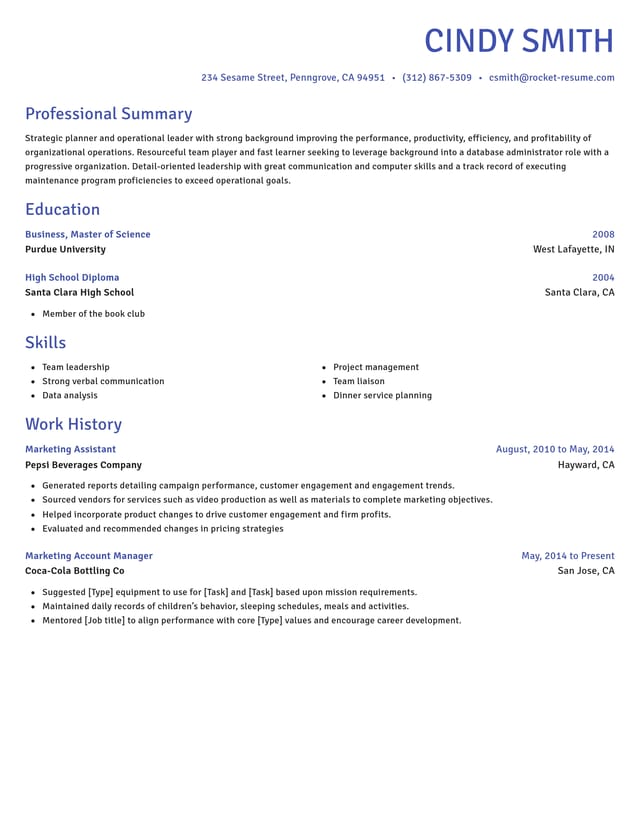
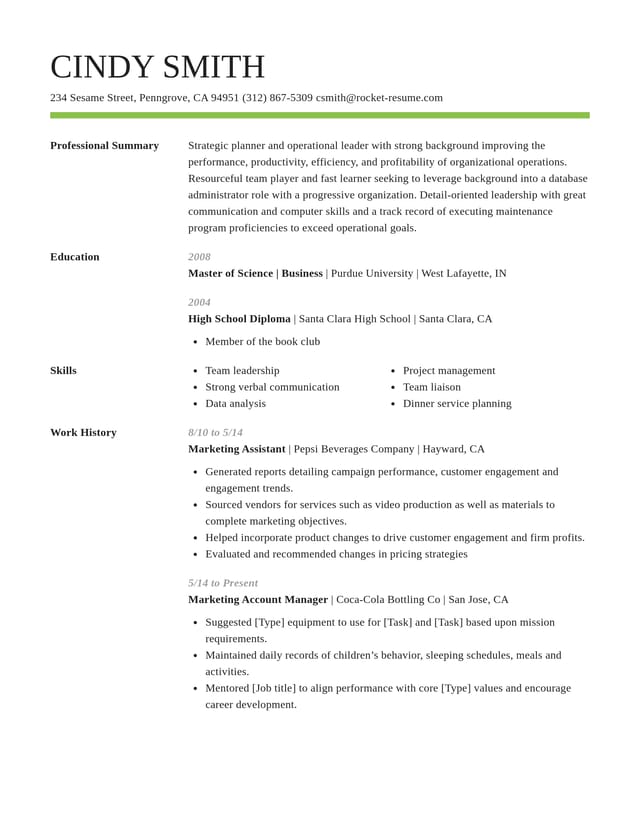
Pick an easy-to-read design to begin


What makes our resume builder simple to use
Does the formatting for you
Pick any design and the fonts, spacing and margins are set. Type your details and they fall into place, however many jobs you add.

AI-enhanced lines you can trim
Type your job title to see AI-enhanced suggestions for the role. Keep the accurate lines and pare them back to plain words.

Check the page as you write
The preview updates with each line you add or edit, so you can spot a crowded section and trim it before moving on.
Standard headings, your order
Every design puts your details under headings recruiters know, like Work History and Skills, and you can change the order of the sections.
What the hiring research means for a simple resume
“This service is amazing, a customer for life.”

“We come back to Rocket Resume, it's the best!”

What people ask before building a simple resume
What is a simple resume builder?
It's an online tool that handles the layout while you fill in your details. Rocket Resume's builder prompts you for each section, suggests wording for your job title and sets everything in a design you can switch whenever you like.
Is a simple resume builder hard to learn?
It's made to be picked up as you go. Each screen asks about one part of your resume, the design handles how the page looks and you can switch designs partway through without losing your text.
How quickly can I finish a simple resume?
Under 10 minutes for many people who have their work dates and schools ready. Pick a design, add your jobs newest first, keep any suggested lines that fit and write a short summary last.
What font should I use on a simple resume?
Use one common, readable font for the whole page, with bold for headings rather than a second typeface. Each Rocket Resume design sets the font, headings and spacing for you, so the page stays consistent while you focus on the words.
Can applicant tracking systems read a simple resume?
Usually, yes. Standard headings, plain text and a clear order are what these systems read most reliably, and every Rocket Resume design is ATS-friendly. Where the job ad names a skill or tool you've really used, borrow its wording, since each employer sets up its software differently.
Can I change the order of sections in the builder?
Yes. Move any section up or down and the design adjusts around it. Keep your summary at the top, then lead with whichever section makes your strongest case: usually Work History, or Education if you've just graduated.
Can I work on my resume over more than one day?
Yes. Save your resume to an account and it stays there between visits, so you can add a section today and finish the rest another day, on this device or another.
Build from an example in your field
Featured this week




- 10 examples
- 8 examples
- 7 examples
- 19 examples
- 37 examples
- 17 examples






Show all 48 industries (A–Z)Show fewer
- Aerospace & Defense, 8 examples
- Agriculture, 23 examples
- Apparel & Textiles, 13 examples
- Architecture, 15 examples
- Artificial Intelligence, 6 examples
- Arts & Entertainment, 24 examples
- Automotive, 21 examples
- Beauty & Personal Care, 17 examples
- Biotechnology & Life Sciences, 7 examples
- Business Services, 23 examples
- Chemical Engineering, 4 examples
- Childcare, 14 examples
- Construction, 106 examples
- Creative, 15 examples
- Customer Service, 17 examples
- Education, 94 examples
- Energy, 39 examples
- Environmental Science, 5 examples
- Finance, 63 examples
- Food & Beverage, 68 examples
- Government, 48 examples
- Healthcare, 160 examples
- Hospitality, 35 examples
- Human Resources, 18 examples
- Insurance, 10 examples
- Legal, 12 examples
- Logistics, 37 examples
- Manufacturing, 68 examples
- Marketing, 8 examples
- Media, 20 examples
- Military, 24 examples
- Mining & Metals, 9 examples
- Nonprofit, 8 examples
- Pharmaceuticals, 11 examples
- Public Relations, 10 examples
- Real Estate, 7 examples
- Retail, 38 examples
- Robotics, 11 examples
- Sales, 14 examples
- Security Services, 19 examples
- Social Services & Counseling, 21 examples
- Social Work, 14 examples
- Sports & Fitness, 96 examples
- Technology, 67 examples
- Telecommunications, 6 examples
- Tourism & Travel, 8 examples
- Transportation, 38 examples
- Veterinary, 9 examples
Don’t see your job title?

Building a resume without the fuss, in their words
from 4,000+ reviews