Resume builder for a perfect
Our resume builder sets your fonts and spacing and suggests expert wording for your job title. You check what makes a perfect resume: tense, length, typos and the ad's terms.
- Fonts, headings and spacing set for you
- AI-enhanced lines written for your job title
- See your whole resume before you download
- Switch designs and keep every word

Mitchel D.
Jan 2024
“A fantastic source for resume building.”

Pablo
Jul 2022
“I really appreciate all the great tools”

Tracy A.
Mar 2026
“User-friendly, I would recommend it to others.”

Jason B.
Feb 2025
“A great website, I got a job.”
from 4,000+ reviews


How to polish your resume before you send it
A perfect resume has no detail that makes a hiring manager wonder whether you were careful: every bullet follows one pattern, each job sits in the right tense and every name is spelled right. If you write it in our resume builder, the design sets your fonts, spacing and alignment, so the checks below cover your words and any bold or italics you add. Do them in order once the writing is done.
How do I keep tense, punctuation and capitals consistent?
Pick one style for each small detail and use it everywhere. Mixed styles, such as one bullet ending in a period and the next without, make a page feel careless even when the reader can't say why. Go through your resume once for each item below, since one kind of slip is easier to spot than several at once.
- Tense: past tense for jobs you've left, present tense for what you still do in your current role.
- Bullets: each one opens with a verb, and either all end with a period or none do.
- Styling: bold and italics used the same way in every job, and no job's lines switched to a numbered list.
- Capitals: job titles, employers and tools written the same way each time, such as Excel and QuickBooks, never excel or Quickbooks.
- Numbers: the same style for every figure in every section, such as 12 stores and a 30% rise.
- Dates: your design writes every job's dates in one style and puts Present against the job you hold now, so check only that each month and year is right and your newest job comes first.
Our resume writing FAQs settle the common arguments, from past or present tense to whether you can use "I". Not sure what to do when one bullet runs to two sentences? The FAQ on this page has the rule.
How long should a perfect resume be?
One page, for most people with under 10 years of experience. Move to two once you have more relevant work than one page can hold, with your strongest lines on page one. Either way, look for bullets that spill a word or two onto a new line and trim each one to fit, since every spill costs a full line. Then cut duties every applicant in your field shares, which tell a reader nothing about you.
How do I catch typos I keep reading past?
Change the way you read. After a few passes your eyes fill in the words you meant, so read the resume from the last line up or hand it to someone who hasn't seen it. Then check by hand what spell check can't judge: employer and school names, and real words in the wrong place, like manger for manager or form for from. Our guide to making your resume stand out recommends the same bottom-up read.
Does my resume use the job ad's exact terms?
It should, wherever they honestly describe your work, spelled the way the ad spells them. A recruiter searching for Salesforce or PMP is looking for those words, so a line about "CRM software" or "a project certification" can get missed. Copy tool names, certifications and capitals exactly, and write an acronym out in full once, such as Certified Public Accountant (CPA), before you use the short form. If your resume opens with a headline or summary, name the role the way the posting does, such as Accounts Payable Specialist rather than AP Clerk, as long as it fits what you do. Our answer on whether you need the ad's exact keywords explains how far to take it.
What should I check in my last read before sending?
Read the whole page once more at normal speed, the way an employer will, then run through these checks:
- No doubled words or half-finished phrases are left where you rewrote a line.
- No bullet repeats a point you already made under another job.
- Nothing is left over from an earlier version, like another company's name in your summary.
Small slips matter more when a reader has a stack to get through. As the hiring research shows, employers now see far more applications for each hire than a few years ago, so a careless detail gives a busy reader an easy reason to move on.
Build a polished resume with Rocket Resume
Rocket Resume's builder takes you through your resume one section at a time, and every design in the template gallery is ATS-friendly. Type a job title to get AI-enhanced expert lines to start from, and edit any of them as you go. See what the builder handles while you proofread, then start:
- Give your experience level and choose a design, which you can change later without retyping a line.
- Fill in your contact details and each job, and keep the expert suggestions for that title that are true for you.
- Add your education, skills and summary, then reword any line and drag sections into order on the final screen.
- Read your whole resume there from the last line up, then download it and apply.
Templates that give every section the same look


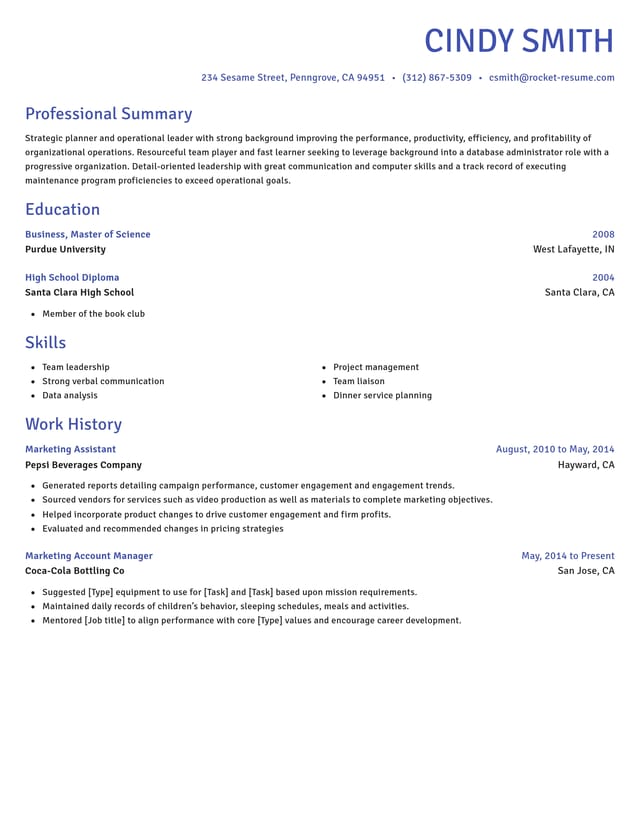
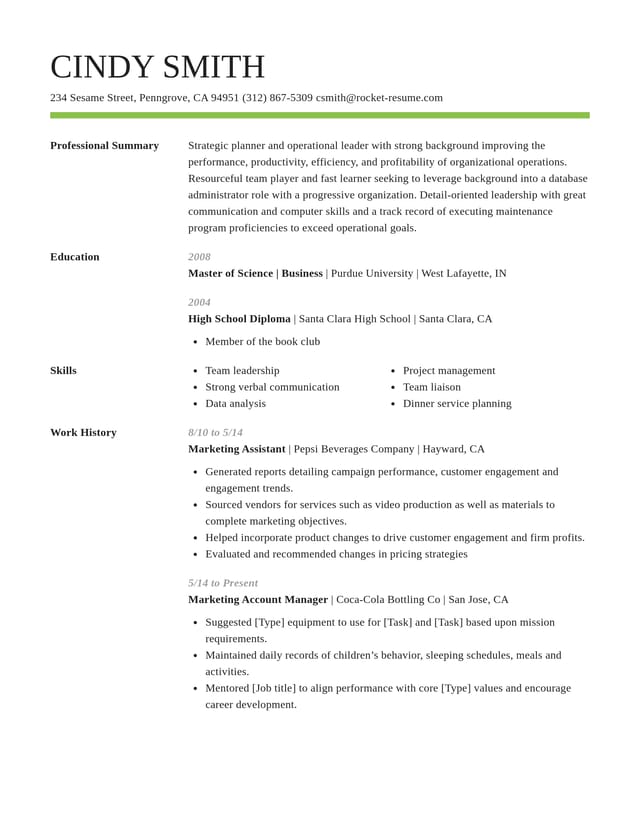
What the builder handles while you proofread
Spacing and alignment set for you
Your design sets the font, spacing and alignment of every heading, date and bullet, so you never need to line anything up by hand.

Expert wording, your details
Choose AI-enhanced expert lines for each job title you type, then fill in your own figures and names and check them against your records.

Your full resume to proofread
The final screen shows your whole resume before download, so you can catch a stray bold word or a bullet wrapping by one word.

One copy per job ad
Applying to several ads? Duplicate your resume in My Library once per job, tailor each version, then give it a last read of its own.
Why small mistakes matter when so many people apply
“This service is amazing, a customer for life.”

“We come back to Rocket Resume, it's the best!”

Questions about getting your resume right
What makes a resume perfect?
A perfect resume lets nothing distract from your experience. Every detail follows one pattern, from verb tense to bullet endings, nothing is misspelled, and the skills the job ad lists first are easy to find near the top.
Should my resume be in past or present tense?
Use past tense for jobs you've left and present tense for duties you still do in your current role. A project you finished at your current job can take the past tense. Keep each bullet in one tense from start to finish.
How can I cut my resume to one page?
Trim older roles to their best one or two lines and drop any skill the job ad doesn't ask for. Cut a summary sentence that only repeats your job title. If it still runs over and you have 10 or more years of relevant work, a second page is fine.
How do I proofread my resume?
Leave it for a few hours, then read it on a different screen, such as your phone, since a fresh look shows slips you'd stopped seeing. Then check every name and number against your records before you send it.
Do I need to check the formatting myself?
Only the styling you add. Your design sets the fonts, headings, spacing and alignment on every line. If you put any words in bold or italics, or set a job's lines as a numbered list, check that every job follows the same pattern.
Should I spell out numbers on a resume?
Many resume writers use numerals even for small figures, such as 8 clients, because they're easier to spot. Whichever you choose, use it in every section, percentages included.
Do resume bullets need periods?
Either style is fine if every bullet follows it. Fragments often go without, but if any bullet runs to two sentences, end every bullet with a period. A summary written as a paragraph takes periods either way.
Build from an example in your field
Featured this week



 21 examples
Mental Health Counselor · Behavioral Health Technician · Life Coach

- 106 examples
- 6 examples
- 94 examples
- 19 examples
- 8 examples
- 160 examples






Show all 48 industries (A–Z)Show fewer
- Aerospace & Defense, 8 examples
- Agriculture, 23 examples
- Apparel & Textiles, 13 examples
- Architecture, 15 examples
- Artificial Intelligence, 6 examples
- Arts & Entertainment, 24 examples
- Automotive, 21 examples
- Beauty & Personal Care, 17 examples
- Biotechnology & Life Sciences, 7 examples
- Business Services, 23 examples
- Chemical Engineering, 4 examples
- Childcare, 14 examples
- Construction, 106 examples
- Creative, 15 examples
- Customer Service, 17 examples
- Education, 94 examples
- Energy, 39 examples
- Environmental Science, 5 examples
- Finance, 63 examples
- Food & Beverage, 68 examples
- Government, 48 examples
- Healthcare, 160 examples
- Hospitality, 35 examples
- Human Resources, 18 examples
- Insurance, 10 examples
- Legal, 12 examples
- Logistics, 37 examples
- Manufacturing, 68 examples
- Marketing, 8 examples
- Media, 20 examples
- Military, 24 examples
- Mining & Metals, 9 examples
- Nonprofit, 8 examples
- Pharmaceuticals, 11 examples
- Public Relations, 10 examples
- Real Estate, 7 examples
- Retail, 38 examples
- Robotics, 11 examples
- Sales, 14 examples
- Security Services, 19 examples
- Social Services & Counseling, 21 examples
- Social Work, 14 examples
- Sports & Fitness, 96 examples
- Technology, 67 examples
- Telecommunications, 6 examples
- Tourism & Travel, 8 examples
- Transportation, 38 examples
- Veterinary, 9 examples
Don’t see your job title?

What Rocket Resume users say about the builder
from 4,000+ reviews